
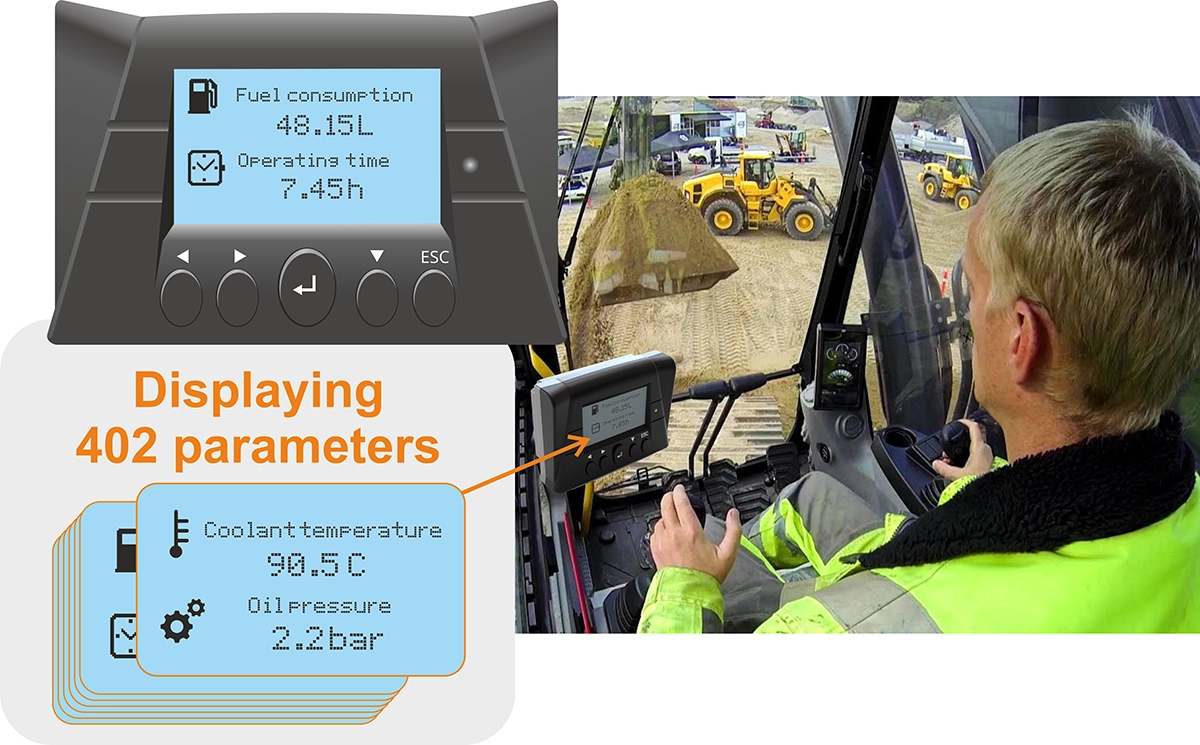
MasterCAN Display 35 is designed for real-time visual monitoring of machinery operating parameters from CAN bus and ISOBUS, as well as from additional CAN J1939 and analog sensors.
- Displays 400 parameters, selectable from a database of over 10,000 machinery operating parameters.
- Automatically scans and decodes CAN J1939/71 and ISOBUS messages.
- Supports the parsing and display of proprietary CAN bus messages.
- Features a built-in converter for translating analog signals into CAN messages.
- Provides flexible configuration options, allowing users to add or remove screens and customize parameter names and units.
In vehicle telematics, MasterCAN Display functions as a dash-mounted CAN display, allowing drivers and operators to monitor essential engine parameters and receive data from additional sensors and ECUs.
It is widely utilized across industries such as construction, agriculture, railways, maritime, mining, and in specialized vehicles for geological exploration and oil production.
MasterCAN Display 35 is highly versatile, capable of handling specific tasks like displaying axle load data for vehicles and semi-trailers, monitoring fuel consumption, or providing real-time fuel tank levels. Equipment manufacturers can offer it as an optional feature, enabling customers to enhance on-board monitoring of CAN bus parameters for better operational control and efficiency.
Parameters available on the screens of MasterCAN Display
- Engine RPM
- Engine Coolant Temperature
- Engine Oil Pressure
- Battery Voltage
- Fuel Level
- Fuel Consumption Rate
- Axle Load
- Transmission Oil Temperature
- Vehicle Speed
- Engine Hours
- Ambient Air Temperature
- Fuel Rail Pressure
- DEF (Diesel Exhaust Fluid) Level
- Brake Pressure
- Hydraulic Oil Temperature
- Gear Position
- Exhaust Gas Temperature
- Tire Pressure Monitoring
- Engine Load Percentage
- … and many more – selection from 10,000+ possible operating parameters!
MasterCAN Display 35 features
Flexible Screen Configuration
MasterCAN Display shows up to 402 parameters, organized into 21 groups with 20 parameters each. The display’s flexible configuration options allow users to select 1 or 2 parameters per screen, upload custom icons, rename parameters or units, and easily add or remove screens within groups.
Ready-to-Use Product—No SDK Required
MasterCAN Display 35 is a fully “out-of-the-box” solution that requires no additional programming or user interface development. There’s no need for HEX value calculations, making setup straightforward.
Configuration involves selecting the network address of the data source (engine, sensors, etc.), choosing parameters from a drop-down list, adding or deleting screens, overlaying bit masks for proprietary CAN messages, and renaming parameters or units as needed.
Automatic CAN and ISOBUS Scanning and Parsing
With over 10,000 parameters (SPNs) from J1939 (for commercial vehicles) and ISOBUS (for agricultural machinery), the MasterCAN Display 35 can display a wide range of data. Once configured, the display automatically scans the CAN bus, recognizing and displaying the available parameter groups (PGNs).